> ## Documentation Index
> Fetch the complete documentation index at: https://docs.plugged.in/llms.txt
> Use this file to discover all available pages before exploring further.
# Introduction
> Welcome to Plugged.in - The Crossroads for AI Data Exchanges
# Welcome to Plugged.in
 ## TL;DR: Plugged.in
**The future of AI won't be about bigger models—it'll be about smarter connections.**
Plugged.in is the unified control plane that solves a critical problem in today's AI landscape: **fragmentation**. Every AI platform—Claude, ChatGPT, Cursor, LM Studio—keeps its own isolated ecosystem of tools, documents, and context. This means you're constantly re-uploading documents, reconfiguring tools, and losing continuity as you switch between models.
Plugged.in changes this by creating **one governed layer** where your knowledge, tools, and memory stay with you across every AI model and platform.
## The Three Pillars
**✅ IN PRODUCTION**
## TL;DR: Plugged.in
**The future of AI won't be about bigger models—it'll be about smarter connections.**
Plugged.in is the unified control plane that solves a critical problem in today's AI landscape: **fragmentation**. Every AI platform—Claude, ChatGPT, Cursor, LM Studio—keeps its own isolated ecosystem of tools, documents, and context. This means you're constantly re-uploading documents, reconfiguring tools, and losing continuity as you switch between models.
Plugged.in changes this by creating **one governed layer** where your knowledge, tools, and memory stay with you across every AI model and platform.
## The Three Pillars
**✅ IN PRODUCTION**
Your documents become a living, searchable knowledge base accessible to any AI. Upload once, and every model can query your PDFs, docs, and files through RAG-powered semantic search. AI models can even create and collaborate on documents directly in your library, with complete version history and model attribution—so you always know which AI (Claude, ChatGPT, etc.) contributed what.
Think of it as GitHub for AI-generated content: full version control, complete ownership, and cross-platform availability.
**✅ IN PRODUCTION**
The Model Context Protocol (MCP) standardized how AI clients connect to external tools, but managing MCP servers is still fragmented—configure once in Claude Desktop, then again in Cursor, then again in VSCode. Plugged.in's universal MCP proxy eliminates this pain: install once, access everywhere.
With 1,500+ MCP servers in the registry and automatic OAuth token management, you get one-click tool installation that works across Claude Desktop, ChatGPT, Cursor, Cline, VSCode, LM Studio, and any MCP-compatible client. Configure your tools once, use them everywhere.
**✅ IN PRODUCTION (v2.20.0)**
Persistent clipboard storage for AI workflows. Store named key-value pairs or use stack-based indexed storage. Features TTL expiration, multiple content types (text, JSON, base64), and cross-platform access via MCP tools and SDKs. Profile-isolated and secure.
Coming soon: Focus Agent, Short-term & Long-term Memory tiers.
## What is Plugged.in?
**Plugged.in is the crossroads for AI data exchanges** - the unified control plane that brings your **Knowledge • Tools • Memory** to every AI model. Install once, govern everywhere.
**The Problem:** Every AI model keeps its own tools, documents, and memories → fragmentation & cost.
**The Solution:** One governed layer for Memory · Knowledge · Tools across every model.
**For beginners:** MCP (Model Context Protocol) servers are like apps that give AI models access to external tools and data. Instead of each AI platform having its own tools, MCP creates a standard way for AI to use the same tools everywhere.
Access the Plugged.in platform
View source code and contribute
Discover and share MCP servers
Integrate with our API
Plugged.in enables seamless integration with any MCP client (Claude, Cline, Cursor, etc.) while providing advanced management capabilities, document-based knowledge augmentation, and real-time notifications through an intuitive web interface.
Star us on GitHub!
Follow us on X
Connect on LinkedIn
Join our community
## Architecture Overview
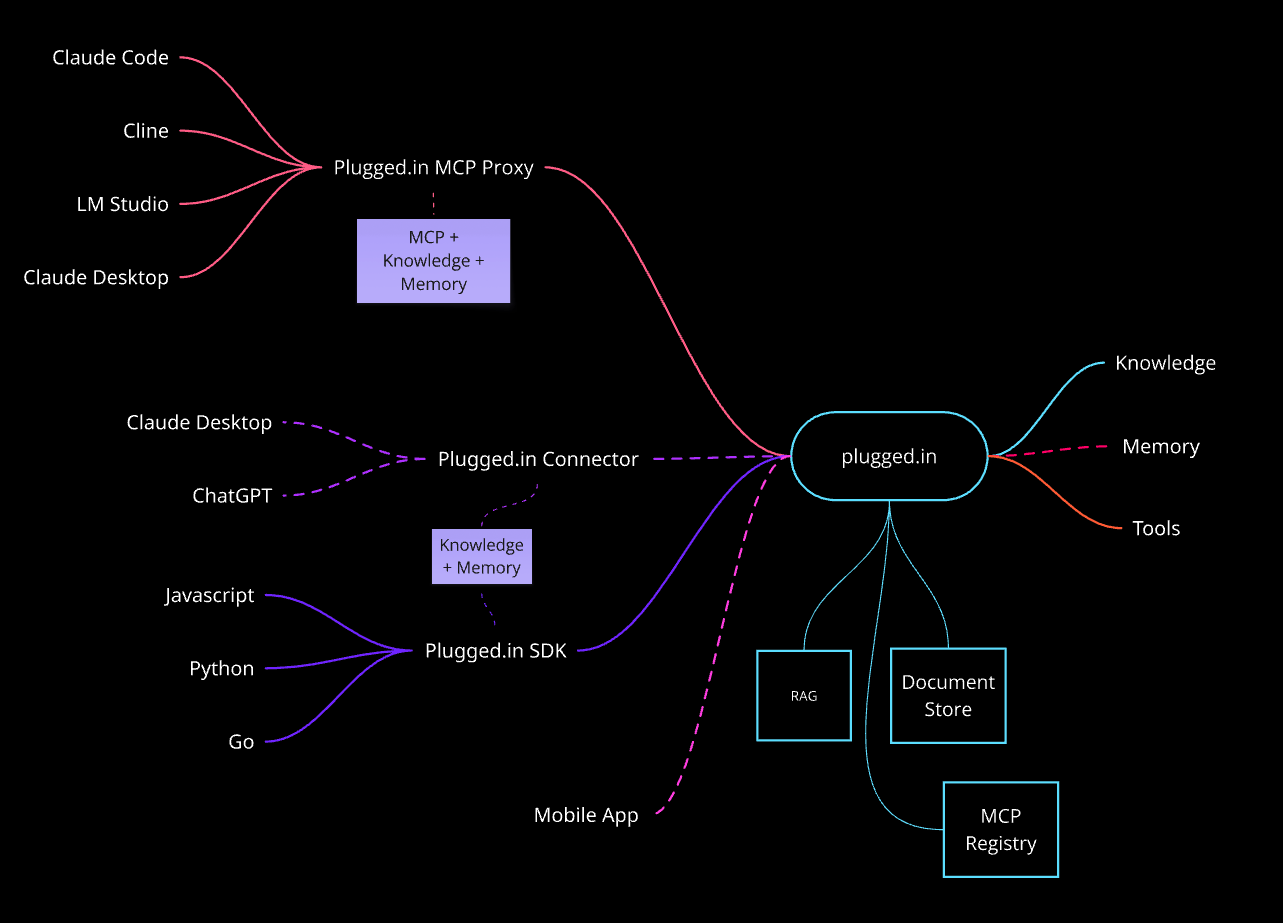 Plugged.in serves as the central hub connecting various AI clients and tools with your knowledge base and MCP ecosystem:
**MCP Proxy Interface**
* Claude Code
* Cline
* LM Studio
* Claude Desktop
**SDK Support**
* JavaScript/TypeScript SDK
* Python SDK
* Go SDK
**Platform Features**
* Knowledge Base (RAG)
* Tool Discovery & Management
* Document Store
* MCP Registry
**Native Connectors** (shown as dashed lines)
* Plugged.in Connector for Claude Desktop
* Plugged.in Connector for ChatGPT
* Mobile App Integration
**Advanced Features**
* Focus Agent & Memory Tiers
* Enhanced Knowledge Sharing
**Solid lines** in the diagram represent production-ready integrations. **Dashed lines** indicate features currently under development.
### Key Components
**pluggedin-app** (v2.20.0)
* Next.js 15 web application
* Social platform for MCP management
* User profiles and sharing capabilities
* Multi-language support
**pluggedin-mcp** (v1.11.0)
* TypeScript MCP proxy server
* Unified interface aggregating multiple MCP servers
* Support for STDIO, SSE, and HTTP transports
* Lightweight Docker deployment
## Core Features
### 🎯 Latest Features (v2.10.0)
* Comprehensive security audit addressing vulnerabilities
* Performance optimizations including database indexing
* Enhanced encryption system overhaul
* Improved error handling and type safety
* Named entries for key-value storage (upsert behavior)
* Indexed stack for push/pop operations
* TTL expiration support
* Multiple content types: text/plain, application/json, base64
* Source tracking: UI, SDK, MCP origin
* Profile isolation with secure access
* MCP tools: pluggedin\_clipboard\_set, pluggedin\_clipboard\_get, pluggedin\_clipboard\_push, pluggedin\_clipboard\_pop, pluggedin\_clipboard\_delete, pluggedin\_clipboard\_list
* Revolutionary document management with AI model attribution
* Complete version tracking and change history
* Content hash-based deduplication
* Support for upload, AI-generated, and API sources
* Multi-step wizard with GitHub verification
* Automatic environment detection
* Registry submission with progress tracking
* OAuth authentication handled by Plugged.in
* User profiles with follow system
* Server and collection sharing
* Activity tracking and trending servers
* Real-time notifications with email delivery
### 🚀 Platform Capabilities
* **Multi-Workspace Support**: Switch between different sets of MCP configurations
* **Interactive Playground**: Test MCP tools directly in the browser
* **Tool Management**: Discover and organize AI tools from multiple sources
* **Resource Discovery**: View available resources and templates
* **Custom Instructions**: Add server-specific instructions as MCP prompts
* **End-to-End Encryption**: AES-256-GCM encryption for sensitive data
## Getting Started
Create your account at [plugged.in](https://plugged.in/register)
Visit the MCP Registry and install some popular servers:
Plugged.in serves as the central hub connecting various AI clients and tools with your knowledge base and MCP ecosystem:
**MCP Proxy Interface**
* Claude Code
* Cline
* LM Studio
* Claude Desktop
**SDK Support**
* JavaScript/TypeScript SDK
* Python SDK
* Go SDK
**Platform Features**
* Knowledge Base (RAG)
* Tool Discovery & Management
* Document Store
* MCP Registry
**Native Connectors** (shown as dashed lines)
* Plugged.in Connector for Claude Desktop
* Plugged.in Connector for ChatGPT
* Mobile App Integration
**Advanced Features**
* Focus Agent & Memory Tiers
* Enhanced Knowledge Sharing
**Solid lines** in the diagram represent production-ready integrations. **Dashed lines** indicate features currently under development.
### Key Components
**pluggedin-app** (v2.20.0)
* Next.js 15 web application
* Social platform for MCP management
* User profiles and sharing capabilities
* Multi-language support
**pluggedin-mcp** (v1.11.0)
* TypeScript MCP proxy server
* Unified interface aggregating multiple MCP servers
* Support for STDIO, SSE, and HTTP transports
* Lightweight Docker deployment
## Core Features
### 🎯 Latest Features (v2.10.0)
* Comprehensive security audit addressing vulnerabilities
* Performance optimizations including database indexing
* Enhanced encryption system overhaul
* Improved error handling and type safety
* Named entries for key-value storage (upsert behavior)
* Indexed stack for push/pop operations
* TTL expiration support
* Multiple content types: text/plain, application/json, base64
* Source tracking: UI, SDK, MCP origin
* Profile isolation with secure access
* MCP tools: pluggedin\_clipboard\_set, pluggedin\_clipboard\_get, pluggedin\_clipboard\_push, pluggedin\_clipboard\_pop, pluggedin\_clipboard\_delete, pluggedin\_clipboard\_list
* Revolutionary document management with AI model attribution
* Complete version tracking and change history
* Content hash-based deduplication
* Support for upload, AI-generated, and API sources
* Multi-step wizard with GitHub verification
* Automatic environment detection
* Registry submission with progress tracking
* OAuth authentication handled by Plugged.in
* User profiles with follow system
* Server and collection sharing
* Activity tracking and trending servers
* Real-time notifications with email delivery
### 🚀 Platform Capabilities
* **Multi-Workspace Support**: Switch between different sets of MCP configurations
* **Interactive Playground**: Test MCP tools directly in the browser
* **Tool Management**: Discover and organize AI tools from multiple sources
* **Resource Discovery**: View available resources and templates
* **Custom Instructions**: Add server-specific instructions as MCP prompts
* **End-to-End Encryption**: AES-256-GCM encryption for sensitive data
## Getting Started
Create your account at [plugged.in](https://plugged.in/register)
Visit the MCP Registry and install some popular servers:
- GitHub Tools - For code analysis and repository management
- Database Tools - For SQL queries and schema exploration
- File System - For local file operations
Start with 2-3 servers to learn the workflow!
Follow our Setup Guide to connect:
- Claude Desktop - Most popular choice
- Cursor/VS Code - For development work
- LM Studio - For local AI models
- ChatGPT - Via HTTP proxy mode
Add documents to your knowledge base:
- Upload PDFs, code files, and documentation
- Use RAG search across all your documents
- Let AI create and manage documents for you
Leverage unified knowledge, tools, and memory across all AI models! 🚀
## Quick Links
* [Installation Guide](/quickstart/installation)
* [Configuration](/quickstart/configuration)
* [Security Overview](/security/overview)
* [API Documentation](/api/reference)
* [Release Notes](/releases/changelog)
## Community & Support
Star us on GitHub!
Follow @PluggedIntoAI
Connect with us
Join r/plugged\_in
Report bugs and request features
Join the community discussion
Get API and technical support
## License
Plugged.in is open-source software licensed under the MIT License. See the [GitHub repository](https://github.com/VeriTeknik/pluggedin-app) for more details.